
Canon IXUS 285 HS Review
Is there a compact digital camera that could work better than the camera on my smartphone? That’s the question I needed to ask before taking one on my travels. I’ve had a couple of budget compact cameras before. They were marketed as having 20MP resolution, or somesuch, but, unlike smartphones, they didn’t have processing hardware capable of handling that resolution, so the end result was usually crap.
The Canon IXUS 285 HS, being a ~£300 dedicated camera device, should be somewhat better.
Operation
Aside from a few additional buttons and features, the basic controls, menu options and interface are near identical to those on my budget Nikon Coolpix S220 device. It has the file viewer, automatic and manual modes, a few presets, etc. The SD card and battery slots are in the exact same place. Even the batteries and external chargers are very similar.
The surface differences are that the IXUS is slightly larger, heavier and has a more expensive feel to it, and it has a much higher resolution screen on the rear that provides a more accurate preview of how an image would look. The less obvious differences include a few interesting pre-processing options that cheaper cameras don’t have, the ability to track faces, facial expressions and moving objects, and a very useful WiFi interface (more on this later). It has also a 12x optical zoom and 48x digital zoom.
Image Quality
The image quality is passable in the default configuration, but still far better than what the Nikon Coolpix could capture. Distant objects won’t be as sharp, and there will be noise in many of the images, but all this is actually because of the Auto mode settings. The average file size is between ~5MB and ~7MB, which isn’t great, I initially thought, but it does contain enough background data for GIMP to work with. Unfortunately they are only saved in JPEG format (no RAW).
The image quality is much better when the IXUS used in Program mode, with the ISO, noise reduction, stabilisation, exposure, auto-focus, compression level, etc. configured. Getting that right does take a bit of work. And it’s important to know the IXUS isn’t a point-and-shoot device - it does a heavy amount of processing when the capture button is pressed half-way, and after the capture button is pressed fully.
With the right configuration and a tripod, the zoom and image stabilisation on the IXUS work surprisingly well. I took the following picture on the Moon, and, as I usually do, later enhanced it using GIMP. The results were much better than I could manage with my smartphone.
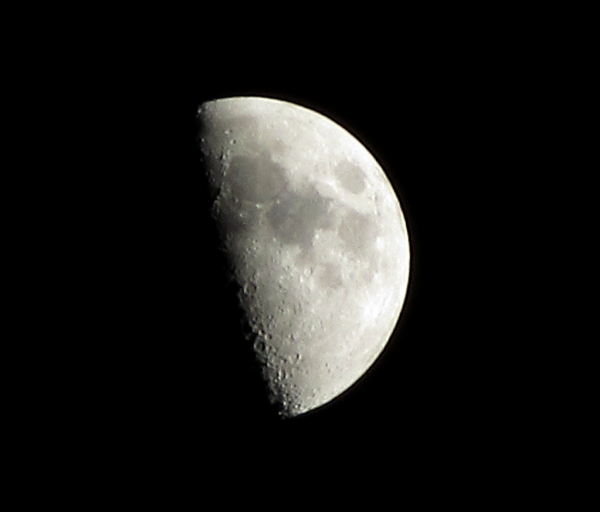
(Scaled version of the image)
It’s very difficult to press the capture button at this level of magnification without blurring the image somewhat, even with the tripod, and the remote operation doesn’t work in Program mode. After using the timer as a workaround, I discovered the image stabilisation had already compensated for the vibration.
Camera Connect
Canon seems to think that USB connections are vestigial. The IXUS does have an outdated AV/USB port, hidden under a flimsy plastic panel, which can’t be used for charging, and my laptop doesn’t detect it as a storage device. A USB-C charging port would have been handy, but I don’t think the pass-through current would be enough to charge the battery. The external charger is needed.
The IXUS does have something much better for previewing, managing and transferring images, though, and that’s a WiFi interface: This enables the device to connect to a network, or to function as its own access point, so it can be accessed from a smartphone with Camera Connect installed. I find this a much better method of sifting through images, deleting the lesser-quality duplicates and transferring files. Not being reliant on a cloud service to back up and transfer images while away is a huge bonus, and it’s ideal for my partner, who likes to post images on social media before I’ve enhanced and compressed them.
There is also a cloud storage service called ‘image.canon’, which is already installed on the IXUS’ firmware, and can be installed on a smartphone. That’s not so useful, because it provides only 10GB of storage, and the camera’s firmware force uploads all new images. Files can be uploaded individually from a smartphone instead, so I suppose the service could be used for backing up the most important files.